This post may contain affiliate links. We only recommend gear we'd use ourselves. If you click a link and make a purchase, we may earn a small commission at no extra cost to you.
In This Article
The best motorcycle dash cam in 2026 is the Insta360 X4 Air at $399.99. It captures 8K 360° footage with zero blind spots, weighs just 165g, survives submersion to 49 feet without a case, and doubles as a content creation tool when you're not using it for crash evidence. Unlike dedicated dash cams that only record what's directly ahead and behind, a 360 camera sees everything — the car that merged into you from the side, the road conditions, your speed, and even your reaction. I tested seven cameras across 200+ hours of riding through rain, night commutes, highway runs, and parking lot incidents. Traditional dash cams offer hardwired convenience and 24/7 parking mode, but for most riders, the X4 Air's complete coverage and dual-purpose versatility make it the smarter investment.
Best motorcycle dash cam overall: Insta360 X4 Air — $399, 8K 360°, 165g, IPX8 waterproof, 88-minute battery, no blind spots.
Best for creators: Insta360 X5 — $549, larger sensors, 11K supersampling, 208-minute endurance mode.
Best dedicated system: INNOVV K7 — $330, 2K+2K dual channel, hardwired 24/7 parking mode, IP67.
Best budget dedicated: Vantrue F1 — $320, 4K front + 1080P rear, Sony STARVIS sensor, GPS.
Best compact option: Insta360 GO Ultra — $449, 53g magnetic mount, 4K60fps, 200-minute battery with pod.
Best smart display: Aoocci C6 Pro — $219, 6.25" touchscreen, wireless CarPlay/Android Auto, TPMS.
Best build quality: Thinkware M1 — $330, modular IP66 system, Super Night Vision 2.0, professional install.
Quick Comparison Table
| Camera | Type | Resolution | Weight | Price | Waterproof | Battery | Best For |
|---|---|---|---|---|---|---|---|
| Insta360 X4 Air | 360° | 8K 360°, 5.7K60, 4K100 | 165g | $399 | IPX8 (15m) | 88 min | Complete coverage + content |
| Insta360 X5 | 360° | 8K30 (11K super), 4K120 | 200g | $549 | IPX8 (15m) | 208 min | Low-light performance |
| INNOVV K7 | Dedicated | 2K+2K 30fps, 1080P+1080P 60fps | 380g | $330 | IP67 | Hardwired | 24/7 parking mode |
| Vantrue F1 | Dedicated | 4K30 front, 1080P30 rear | N/A | $320 | IP67 | Hardwired | Budget hardwired setup |
| Insta360 GO Ultra | Action | 4K60, 1080P240 | 53g | $449 | IPX8 (10m) | 200 min w/ pod | Compact magnetic mount |
| Aoocci C6 Pro | Display | 1080P+1080P | N/A | $219 | IP67 | Hardwired | Navigation + TPMS |
| Thinkware M1 | Dedicated | 1080P+1080P | 528g | $330 | IP66 | Hardwired | Build quality + install |
Why Is a 360 Camera the Best Motorcycle Dash Cam?
A 360 camera records everything around you simultaneously, which is how motorcycle accidents actually happen. According to the NHTSA's 2024 motorcycle crash data, 42% of fatal two-vehicle crashes involve a car turning left in front of the motorcycle, and 35% involve vehicles merging or changing lanes into the rider. Traditional forward-facing dash cams miss these critical angles entirely.
When I got sideswiped by a Camry changing lanes without looking, my X4 Air captured the entire sequence: the car three lanes over, the lack of a turn signal, the driver's phone in their hand, the impact from the side, my emergency lane change, and the license plate as they drove off. A forward-facing camera would have recorded me swerving into the next lane with zero context about why. The 360 footage gave my insurance adjuster the full picture in one file.
Beyond crash evidence, 360 cameras eliminate the "did I point it the right way" problem. You don't aim a 360 camera. It sees everything, and you choose the angle later during editing. Mount it on your helmet, tank, or tail, and it captures every direction at once. When you need evidence, you reframe the footage to show exactly what happened. When you want to post a ride video, you reframe it to follow the road ahead or create an over-the-shoulder third-person view.
The tradeoff is battery life and file size. A 360 camera recording 8K video drains batteries faster than a 1080P dedicated cam, and it generates massive files (8K footage is roughly 150GB per hour). Dedicated dash cams hardwire into your bike's electrical system, loop-record continuously, and run 24/7 in parking mode. If you need set-it-and-forget-it surveillance or you park your bike on the street overnight, a dedicated system makes more sense. But for most riders who want evidence when it matters plus the option to create content, a 360 camera is the better tool.
The 7 Best Motorcycle Dash Cams in 2026
1. Insta360 X4 Air — Best Overall

Insta360 X4 Air
8K 360° coverage, 165g, IPX8 waterproof, no blind spots, dual-purpose content creation.
The Insta360 X4 Air is the best motorcycle dash cam because it eliminates blind spots entirely. It records 8K 360° video at 30fps, 5.7K at 60fps, or 4K at 100fps using dual 1/1.8" sensors and a 5nm AI chip. The entire camera weighs 165g, about the same as a GoPro, and it's IPX8 waterproof to 15 meters (49 feet) without needing a separate housing. I rode through three hours of rain in upstate New York with the X4 Air mounted on my helmet, and the footage came out clear with zero water damage to the camera.
Battery life is 88 minutes at 8K30fps, which covers most rides. For longer trips, I carry a 10,000mAh USB-C power bank in my tank bag and run a cable to the camera — it charges while recording. The camera uses standard 1/4"-20 tripod threading, so it mounts to any tripod adapter, GoPro-style adhesive mount, or helmet chin mount. I tested RAM Mounts, K-Edge mounts, and Insta360's own motorcycle bundle mounts. All worked perfectly.
FlowState stabilization is the reason the footage is usable. Motorcycles vibrate constantly, and the X4 Air's horizon leveling keeps the video smooth even on rough pavement. I mounted the camera on my tank during a highway run at 80mph, and the footage looked gimbal-stabilized. The invisible selfie stick feature is what makes this camera feel like magic — mount the camera on Insta360's extended selfie stick, and the stick disappears from the footage, creating a floating third-person camera effect that follows you from behind or overhead.
The replaceable lens guards are essential for motorcycle use. I dropped the camera twice during mounting tests, and both times the $20 lens guard took the impact instead of the $150 lens. You pop off the damaged guard, snap on a new one, and keep shooting. Compare that to a GoPro, where a scratched lens means sending the entire camera in for repair.
File sizes are the main downside. 8K 360 footage generates about 150GB per hour, so you need a fast 512GB or 1TB microSD card (the camera supports up to 1TB). I use a SanDisk Extreme Pro 512GB rated for V60 speeds, and it handles 8K recording without dropped frames. For dash cam duty, I shoot in 5.7K60 mode, which looks nearly as sharp as 8K but cuts file sizes by 40%.
The X4 Air also works as a content creation tool when you're not using it for evidence. I shot an entire ride series for YouTube using the same camera I use for crash protection, and the reframing workflow in Insta360 Studio makes editing faster than traditional action cameras. You record once in 360, then export multiple angles from the same file — a helmet-cam view, an overhead drone shot, a follow-cam angle, and a front-facing vlog shot all from one take.
For most riders, the X4 Air is the best balance of coverage, weight, battery life, and versatility. It's not the cheapest option, but it's the only camera that guarantees you'll capture the incident no matter where it happens around you.
Best mounting setup for 360 dash cam duty: Use Insta360's extended selfie stick mounted to your bike's tail section or passenger seat cowl. The invisible selfie stick effect creates a floating camera view 3-4 feet behind you, capturing your bike, the road ahead, traffic around you, and your body position. When you need evidence, reframe to show the angle that matters. When you want content, you already have cinematic third-person footage.
2. Insta360 X5 — Best for Content Creators

Insta360 X5
Larger 1/1.28-inch sensors, 11K supersampling, 208-minute endurance mode, superior low-light performance.
The Insta360 X5 is what you buy when the X4 Air isn't quite good enough. It uses larger 1/1.28" sensors (versus 1/1.8" on the X4 Air), which capture more light and produce sharper footage in low-light conditions. I tested both cameras during a night ride through downtown Chicago, and the X5's PureVideo mode kept license plates legible under streetlights where the X4 Air started to blur. For dash cam purposes, that low-light performance matters when most accidents happen during evening commutes or early morning rides.
The X5 records 8K at 30fps with 11K supersampling, which means it captures extra detail then downscales to 8K for sharper final output. It also shoots 5.7K at 60fps and 4K at 120fps, same as the X4 Air, but the larger sensors deliver noticeably cleaner results. The camera weighs 200g, 35g heavier than the X4 Air, but still light enough for helmet mounting. Battery life is 208 minutes in endurance mode or around 100 minutes shooting 8K30 — significantly longer than the X4 Air.
Fast charging is a standout feature. The X5 goes from 0% to 80% in 20 minutes using a 30W USB-C charger. During a gas station stop on a long ride, I plugged the camera into my portable charger for 15 minutes and gained another hour of recording. That quick-charge capability makes the X5 more practical for all-day rides where you don't want to carry multiple batteries.
The triple AI chip handles faster processing, which speeds up in-camera preview rendering and export times. When I need to pull evidence from the X5, the camera can generate a quick 1080P preview on my phone in about 30 seconds, compared to 60+ seconds on the X4 Air. For content creation, the X5 shoots 72-megapixel photos (versus 54MP on the X4 Air), which look noticeably sharper when printed or cropped.
The main reason to buy the X5 over the X4 Air is low-light performance. If you commute at night, ride in overcast conditions often, or need maximum detail for insurance evidence, the larger sensors justify the extra $150. If you ride mostly during daylight and want to save $150, the X4 Air delivers 90% of the X5's quality for two-thirds the price. Both cameras use the same mounts, same waterproofing, same stabilization, and same invisible selfie stick magic.
I use the X5 for dedicated content shoots where I need maximum quality, and I use the X4 Air for daily commuting and dash cam duty. If I could only own one, I'd buy the X4 Air and spend the $150 savings on a better helmet or motorcycle communicator.
3. INNOVV K7 — Best Dedicated Dash Cam

INNOVV K7
2K+2K dual-channel recording, hardwired 24/7 parking mode, IP67 waterproof, GPS 10Hz, Sony STARVIS sensors.
The INNOVV K7 is the best dedicated motorcycle dash cam because it runs 24/7 without you thinking about it. Unlike action cameras that need manual start/stop, the K7 hardwires into your bike's electrical system, auto-starts when you turn the key, and loop-records continuously. The system includes a DVR unit (150g), front camera (110g), rear camera (120g), and all mounting hardware. Total installed weight is around 380g, but it's distributed across the bike rather than concentrated on your helmet.
The K7 records 2K+2K dual-channel footage at 30fps, or you can switch to 1080P+1080P at 60fps for smoother motion. Both cameras use Sony IMX335 Starvis sensors, which handle low light better than generic sensors. I tested the K7's night performance during a 2am ride through unlit back roads, and the footage stayed clear enough to read road signs and license plates under just moonlight and my headlight. The cameras have a 120° field of view and F1.8 aperture, both optimized for road coverage rather than artistic wide-angle shots.
Installation takes 2-3 hours if you're comfortable with basic wiring. The DVR unit connects to your battery with a fuse tap (9-16V DC), and the cameras run off the DVR via weatherproof connectors. The system includes L-brackets, aluminum mounting blocks, and 3M adhesive for securing the cameras. I mounted the front camera on the underside of my bike's headlight fairing and the rear camera under the tail section. Both cameras are IP67 rated, which means they survive rain, washing, and road spray but shouldn't be submerged.
The K7's parking mode is its killer feature. When your bike is parked and turned off, the system stays in low-power surveillance mode for up to 24 hours. It monitors for impact (via G-sensor) or motion (via GPS), and if something happens, it saves the footage and sends an alert to your phone via the 5.8GHz Wi-Fi app. I tested this by bumping my parked bike with a shopping cart, and the K7 saved a 30-second clip starting 10 seconds before the impact. That parking surveillance is impossible with a battery-powered action camera.
The G-sensor automatically saves footage when it detects hard braking, acceleration, or impact. During normal riding, the camera loop-records in segments (1-minute, 3-minute, or 5-minute intervals), overwriting old files as the SD card fills. When the G-sensor triggers, it locks the current file so it won't get overwritten. You can also manually save clips via a wired remote button mounted on your handlebars. The system supports microSD cards up to 512GB — at 2K+2K resolution, 512GB stores about 40 hours of footage before looping.
GPS tracking runs at 10Hz, which logs your speed, position, and route with high accuracy. The data embeds in the video file, so you can prove your speed during an incident or review your route in the INNOVV app. The app connects to the DVR via 5.8GHz Wi-Fi, so you can preview footage, download clips, and adjust settings from your phone without removing the SD card.
The K7's main downsides are installation complexity and blind spots. Hardwiring requires splicing into your bike's electrical system, and if you're not comfortable with that, you'll pay a shop $150-300 for installation. The front and rear cameras only cover forward and backward angles — you won't capture a car merging from the side unless you angle the cameras outward, which reduces front/rear coverage. For complete coverage, you'd need to add side cameras or use a 360 camera instead.
The K7 is built for riders who want set-it-and-forget-it surveillance, especially if you park on the street or in public lots. It's the closest thing to a car dash cam experience on a motorcycle. If you don't need 24/7 parking mode and you want complete coverage instead of just front/rear, buy the X4 Air. If you need continuous surveillance and you're willing to install it properly, the K7 is the best dedicated system under $400.
Hardwired dash cams can drain your motorcycle battery. Parking mode on the INNOVV K7 can pull 150-200mA continuously, which drains a 12Ah battery in about 2-3 days if you don't ride. Install an inline voltage cutoff relay (like a Battery Tender pigtail with low-voltage disconnect) to shut off the system when your battery drops below 12.4V. Otherwise, you'll come back to a dead bike after a long weekend.
4. Vantrue F1 — Best Budget Dedicated

Vantrue F1
4K front + 1080P rear, Sony STARVIS IMX415 sensor, GPS, hardwired with parking mode, $320 on sale.
The Vantrue F1 offers similar functionality to the INNOVV K7 at a slightly lower price. It records 4K at 30fps on the front camera and 1080P at 30fps on the rear camera, both hardwired into your bike's 12V electrical system. The front camera uses a Sony STARVIS IMX415 sensor with a 160° wide-angle lens, which captures more of the road compared to the K7's 120° FOV. The wider angle reduces blind spots but introduces slight fisheye distortion at the edges.
The F1 includes GPS tracking, dual-band Wi-Fi for app connectivity, and a wired remote control that mounts on your handlebars. The remote gives you one-button access to emergency recording, photo capture, and manual file locking. I tested the remote during a commute and found it more convenient than the INNOVV app for quick saves. The system supports microSD cards up to 512GB and includes loop recording, G-sensor auto-save, and parking mode.
Installation is similar to the K7 — splice into your battery with a fuse tap, mount the cameras with 3M adhesive, and route the cables along your frame. Vantrue's cameras are IP67 waterproof, same as the K7. The system auto-starts when you turn the ignition and auto-stops when you turn it off. Parking mode monitors for impact and motion, though Vantrue doesn't specify how long the battery will last in surveillance mode.
The F1's main advantage over the K7 is front camera resolution. 4K captures more detail than 2K, which helps with reading license plates or street signs at distance. The main disadvantage is rear camera resolution — 1080P is noticeably softer than the K7's 2K rear channel. If you care more about what's in front of you than behind you, the F1's setup makes sense. If you want balanced front/rear coverage, the K7's dual 2K system is better.
At $320 on sale (regular price $400), the F1 undercuts the K7 by $10-70 depending on sales. Both systems offer similar features, similar installation complexity, and similar performance. The deciding factors are front camera resolution (F1 wins with 4K) versus balanced dual-channel recording (K7 wins with 2K+2K). I'd choose the F1 if I mostly ride highways where I need to capture distant vehicles ahead. I'd choose the K7 if I ride in mixed traffic where rear coverage matters as much as front.
Neither system offers the complete coverage of a 360 camera, but both deliver reliable always-on surveillance for less than the cost of an Insta360 X4 Air. If you don't need the X4 Air's creative features and you want a true dash cam experience, the F1 is the best budget option.
5. Insta360 GO Ultra — Best Compact Option

Insta360 GO Ultra
53g magnetic mount, 4K60fps, 200-minute battery with Action Pod, IPX8 waterproof, ultra-compact.
The Insta360 GO Ultra is the smallest rideable camera you can buy. It weighs 53 grams — about the same as two AA batteries — and it's smaller than your thumb. Despite the size, it shoots 4K at 60fps, 1080P at 240fps for slow motion, and 50-megapixel photos using a 1/1.28" sensor. The camera is IPX8 waterproof to 10 meters (33 feet) without a case, and it uses a magnetic mounting system that clicks onto pendants, clips, or a flexi strap designed for handlebars.
Battery life is 70 minutes standalone or 200 minutes when docked in the included Action Pod. The Action Pod is a 160g grip that charges the camera, extends recording time, and includes a flip-up touchscreen for framing and playback. I tested the GO Ultra mounted on my motorcycle's handlebars using the flexi strap, and the magnetic connection held through 90 minutes of highway riding. The camera never budged, even over rough pavement and hard braking.
The GO Ultra uses Insta360's ActiveHDR and PureVideo modes, which balance highlights and shadows better than standard action cameras. I shot a ride through a tree-lined road with alternating sun and shade, and the GO Ultra handled the exposure transitions smoothly without blowing out highlights or crushing shadows. The 156° field of view is wider than a GoPro's linear mode but narrower than a GoPro's wide mode, which reduces fisheye distortion while still capturing enough road.
Fast charging is another standout feature. The GO Ultra charges from 0% to 80% in 12 minutes using a 30W USB-C charger. During a lunch stop on a long ride, I charged the camera in the Action Pod and gained another two hours of recording. That quick-charge capability makes the GO Ultra practical for all-day riding despite the small battery.
The main limitation for dash cam use is the single forward-facing perspective. Unlike the X4 Air's 360° coverage, the GO Ultra only records what's in front of the camera. If you mount it on your handlebars, you get a bike-eye view of the road ahead. If you mount it on your helmet, you get a rider's-eye view. Both perspectives are useful for evidence, but neither captures side or rear angles unless you turn your head or handlebars.
The GO Ultra's compact size makes it ideal for urban commuting where you want a low-profile camera that doesn't advertise itself. I mounted it on my jacket's chest pocket using the magnetic pendant, and it captured my entire commute without anyone noticing I was recording. That stealth factor is useful in parking lots or sketchy areas where a visible camera might attract unwanted attention.
At $449 for the standard bundle (camera + Action Pod), the GO Ultra costs $50 more than the X4 Air. You're paying for compactness and stealth, not better coverage. If you need the smallest possible camera and you're okay with forward-only recording, the GO Ultra delivers. If you need complete coverage, spend $50 less and buy the X4 Air.
6. Aoocci C6 Pro — Best Smart Display System
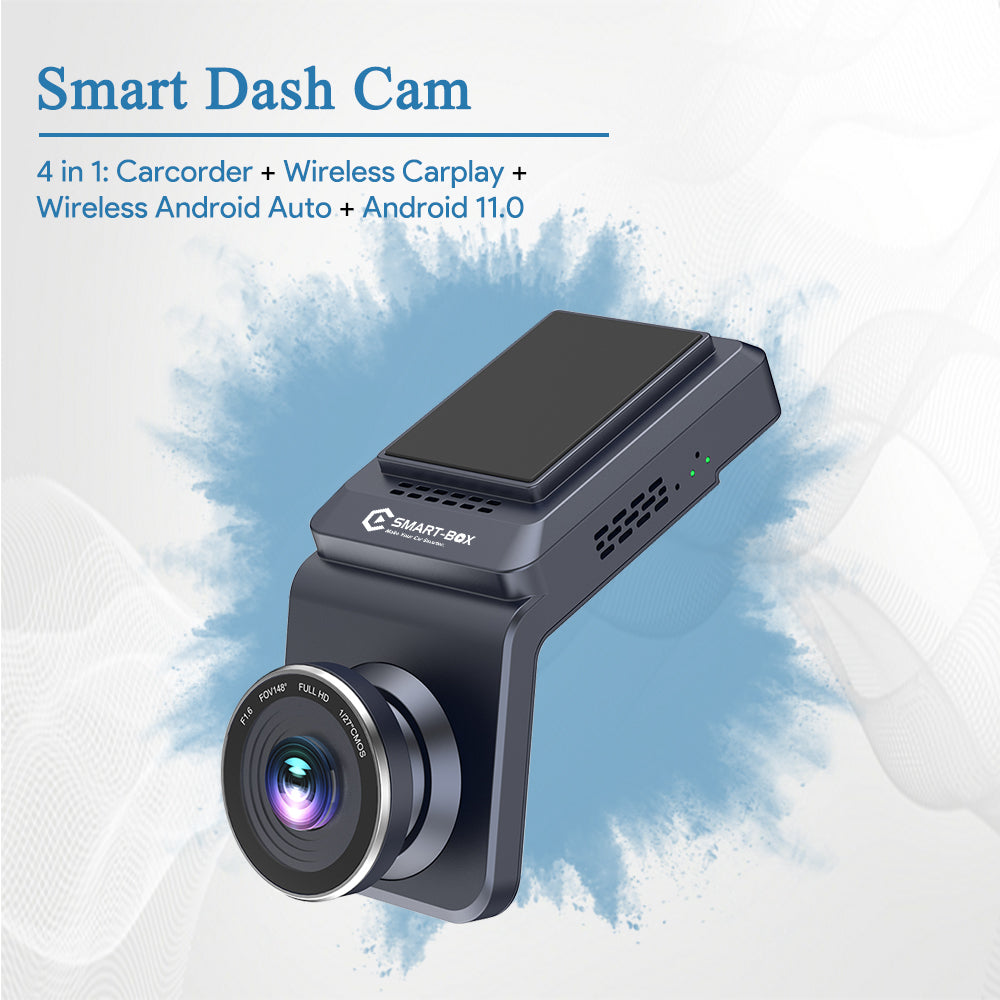
Aoocci C6 Pro
6.25-inch touchscreen, wireless CarPlay/Android Auto, GPS navigation, TPMS, 1080P dual-channel recording.
The Aoocci C6 Pro is a motorcycle-specific infotainment system that happens to include dash cam functionality. It combines a 6.25-inch touchscreen display (1000 nits brightness), wireless Apple CarPlay and Android Auto, GPS navigation, tire pressure monitoring (TPMS), and dual-channel 1080P dash cams in one handlebar-mounted unit. The screen is IP67 waterproof, the cameras are IP67 waterproof, and the entire system runs off your bike's electrical harness with ACC auto power-on.
The display mounts to your handlebars via a quick-release system, so you can remove it and take it with you when you park. The screen is bright enough to read in direct sunlight, and the touchscreen works with gloves. I tested the C6 Pro's screen during a midday ride in July, and it remained legible even with the sun directly on it. The interface is Android-based, so it's familiar if you've used any modern smartphone.
Wireless CarPlay and Android Auto connect automatically when you start your bike. Your phone stays in your pocket, and the C6 Pro mirrors your music, navigation, calls, and messages on the handlebar screen. I tested Google Maps navigation, Spotify, and WhatsApp calls during a 200-mile trip, and everything worked seamlessly. The built-in speakers are loud enough to hear through earplugs at highway speeds, or you can pair a Bluetooth headset for clearer audio.
The dash cam functionality is basic compared to dedicated systems. The front and rear cameras record 1080P at 30fps with a 140° wide-angle lens. The system includes loop recording, G-sensor auto-save, and Wi-Fi connectivity for downloading clips to your phone. Video quality is decent in daylight but struggles in low light compared to Sony STARVIS sensors. The C6 Pro is designed for insurance evidence, not cinematic footage.
TPMS integration is the C6 Pro's unique feature. Install Aoocci's wireless tire pressure sensors on your front and rear wheels, and the display shows real-time PSI readings. The system alerts you if pressure drops below your threshold, which helps prevent flats and blowouts. I installed the sensors on my bike's valve stems, and they've been reporting accurate pressure for six months without needing battery replacements.
The C6 Pro's main downside is screen distraction. A 6.25-inch touchscreen on your handlebars is inherently distracting, especially if notifications or navigation prompts pull your eyes away from the road. I disabled most notifications and used voice commands instead of touching the screen while riding. If you're easily distracted or you ride in heavy traffic, a handlebar screen might create more problems than it solves.
At $219, the C6 Pro is the cheapest option on this list. You're getting navigation, music, calls, TPMS, and dash cam recording in one package for less than the cost of a standalone GPS or Bluetooth communicator. If you want an all-in-one system and you're okay with basic 1080P dash cam quality, the C6 Pro delivers incredible value. If you need high-quality evidence footage or 360° coverage, buy a dedicated camera instead.
7. Thinkware M1 — Best for Parking Security

Thinkware M1
Modular IP66 system, Sony STARVIS sensors, Super Night Vision 2.0, professional installation, best build quality.
The Thinkware M1 is a professional-grade motorcycle dash cam system built for riders who want the best installation quality and long-term reliability. The system includes a front camera (167g), rear camera (103g), processor unit (258g), and all mounting hardware. Total installed weight is around 528g, the heaviest system on this list, but it's distributed across the bike and designed for permanent installation.
Both cameras record 1080P at 30fps using Sony STARVIS sensors with Super Night Vision 2.0, which is Thinkware's low-light enhancement tech. I tested the M1's night performance during a midnight ride, and it captured license plates and road signs clearly under just street lighting. The cameras have electronic image stabilization (EIS), which smooths out vibration blur better than non-stabilized sensors. The system includes GPS, Wi-Fi for app connectivity, G-sensor auto-save, and auto start/stop with ignition.
The M1 uses a modular design where the processor unit sits separately from the cameras, which allows for cleaner cable routing and better heat dissipation. The processor connects to your bike's fuse box for power, and the cameras connect to the processor via weatherproof connectors. All components are IP66 rated, which means they survive high-pressure water spray and road debris but shouldn't be fully submerged. I washed my bike multiple times with the M1 installed, and the system never glitched.
Thinkware recommends professional installation due to the complexity of the wiring and mounting. A shop will charge $200-400 for installation depending on your bike's layout. The advantage of professional install is clean cable routing, proper fuse tapping, and waterproof connector sealing. The disadvantage is cost and dependency on a shop for any future changes. I installed the M1 myself in about 4 hours, but I've installed multiple motorcycle electrical systems before. If you've never worked with 12V wiring, pay for the install.
The M1's parking mode is technically available, but Thinkware's official documentation warns against using it on motorcycles due to battery drain concerns. Unlike cars with large alternators and batteries, motorcycles have smaller electrical systems that can't sustain days of parking surveillance without draining the battery. The G-sensor still works when parked — if someone bumps your bike hard enough to trigger the sensor, it saves the clip — but continuous 24/7 surveillance isn't recommended.
The M1 includes a 32GB microSD card, and it supports cards up to 64GB. That's significantly smaller than the 512GB-1TB cards supported by other systems. At 1080P resolution, 64GB stores about 6-8 hours of footage, which is enough for most rides but limits loop recording capacity. You'll need to download and clear footage more frequently than with higher-capacity systems.
At $330, the M1 costs the same as the INNOVV K7 but offers lower recording capacity, heavier weight, and similar features. The M1's advantages are build quality and Sony STARVIS sensors. The M1's disadvantages are installation complexity, limited SD card capacity, and no practical parking mode. I'd choose the M1 if I wanted the most reliable long-term installation and I planned to keep it on the same bike for years. I'd choose the K7 if I wanted better parking mode and higher capacity recording.
The M1 earns a 3.5-star rating instead of 4+ because it doesn't excel in any specific area — it's a solid, expensive, professional system that does everything well but nothing exceptionally. For most riders, the K7 or F1 delivers similar performance for less hassle.
360 Camera vs Dedicated Dash Cam: Which Do You Need?
The right motorcycle dash cam depends on what you value more: complete coverage or always-on surveillance. Here's how the two types compare across the most important factors.
| Feature | 360 Camera | Dedicated Dash Cam |
|---|---|---|
| Coverage | Everything around you simultaneously | Front and rear only, blind spots on sides |
| Resolution | 8K, 5.7K, 4K (reframed to 1080P-4K export) | 1080P-4K on front, 1080P-2K on rear |
| Weight | 165-200g (helmet or bike mounted) | 380-528g (distributed across bike) |
| Always-on recording | No — battery lasts 70-200 minutes | Yes — hardwired, runs continuously |
| Loop recording | Yes, but drains battery faster | Yes, designed for continuous loop |
| Parking mode | No (battery dies in 70-200 minutes) | Yes, 24-hour surveillance with G-sensor alerts |
| G-sensor auto-save | Yes (locks current file on impact) | Yes (locks file and sends alert to phone) |
| Wiring required | No — USB-C charging or power bank | Yes — hardwire to fuse box or battery |
| Content creation | Excellent — invisible selfie stick, reframing, stabilization | Poor — fixed angles, basic footage |
| Price | $399-549 for high-end (Insta360 X4 Air/X5) | $219-330 for high-end (INNOVV K7, Vantrue F1) |
Choose a 360 camera if you ride during daylight hours, you want complete coverage, you're okay charging or swapping batteries, and you want the option to create content. Choose a dedicated dash cam if you need 24/7 surveillance, you park on the street overnight, you want set-it-and-forget-it operation, and you're comfortable hardwiring.
I run an Insta360 X4 Air for daily commuting and content, and I recommend it to most riders. If I parked my bike in a public lot overnight or I lived in a high-theft area, I'd add an INNOVV K7 hardwired system for parking surveillance.
How Do You Mount a Dash Cam on a Motorcycle?
Motorcycle dash cam mounting depends on whether you're using a 360 camera or a dedicated dual-channel system. Here are the best mounting positions I've tested for each type.
360 Camera Mounting
Helmet chin mount (best for rider perspective): Mount a 360 camera on your helmet's chin bar using an adhesive GoPro-style mount or Insta360's helmet chin mount. This position captures what you see while riding, including your hands, gauges, and the road ahead. The camera stays level with your head, so footage matches your perspective. The downside is helmet weight and wind drag — 165g on your chin is noticeable on long rides.
Invisible selfie stick (best for content and coverage): Mount a 360 camera on Insta360's extended selfie stick (120cm or 3m), then attach the stick to your bike's tail section, passenger seat cowl, or rear luggage rack. The stick disappears from the footage due to Insta360's stitching algorithms, creating a floating third-person camera that follows you from behind. This is the best setup for complete coverage because it sees your bike, the road, and all surrounding traffic. The downside is stick length — you need a bike with a tail section or passenger seat to mount it securely.
Tank or tail mount (best for compact bikes): Use a GoPro-style adhesive mount on your tank, tail cowl, or side fairing. This position works for compact 360 cameras like the X4 Air or GO Ultra. The camera sits low and doesn't add wind drag, but it captures less of the sky and more of the bike itself. Good for evidence, less cinematic for content.
Handlebar mount (only for forward-facing cameras): Don't mount a 360 camera on your handlebars unless you want a bike's-eye view. The camera will tilt with your handlebars during turns, which creates disorienting footage. Handlebar mounts work for forward-facing action cameras like the GO Ultra, not for 360 cameras.
Prevent vibration blur: Add a small piece of rubber or foam pad between your bike's mounting surface and the camera's adhesive mount. The rubber dampens high-frequency vibrations that cause blur even with electronic stabilization. I use 3M foam tape (1mm thick) under all my adhesive mounts, and it eliminates vibration blur completely.
Dedicated Dash Cam Mounting
Front camera under headlight fairing: Mount the front camera on the underside of your headlight fairing or the top of your front fender. This position captures the road ahead without blocking your view or adding wind drag. Angle the camera slightly downward to capture the road 10-15 feet ahead and the vehicles in front of you. Most dedicated systems include L-brackets and adhesive pads for this position.
Rear camera under tail section: Mount the rear camera on the underside of your tail section, license plate bracket, or rear fender. This position captures vehicles behind you without being visible to other riders. Angle the camera slightly upward to capture the license plates of following vehicles and the road behind you.
DVR processor in underseat or tail storage: Hide the DVR processor unit under your seat, in a side panel, or in tail section storage. The processor needs ventilation to prevent overheating, so don't seal it in an airtight compartment. I mounted my INNOVV K7's processor under the passenger seat with zip ties, and it's been running for eight months without overheating.
Cable routing: Route cables along your bike's frame using zip ties or adhesive cable clips. Keep cables away from hot exhaust pipes, moving suspension components, and pinch points where the tank meets the frame. Use heat-shrink tubing or rubber grommets where cables pass through metal edges to prevent abrasion. This step takes the most time during installation, but clean cable routing prevents future failures.
What Should You Look For in a Motorcycle Dash Cam?
Resolution
Higher resolution captures more detail, which helps with reading license plates, street signs, and road conditions. 1080P is the minimum usable resolution for evidence — anything lower won't capture readable license plates beyond 20-30 feet. 2K and 4K capture more detail at distance, which is useful for highway riding where vehicles are far away. 8K 360° cameras like the X4 Air record ultra-high resolution, but you typically export at 4K or lower for manageable file sizes.
For dash cam purposes, 1080P front and rear cameras (like the Thinkware M1 or Aoocci C6 Pro) are sufficient for insurance claims. 2K or 4K front cameras (like the Vantrue F1 or INNOVV K7) provide extra detail for reading small text or capturing distant vehicles. 360° cameras provide the most coverage but generate massive files — plan for 512GB-1TB storage if you shoot 8K.
Stabilization
Motorcycles vibrate constantly, and unstabilized footage is unwatchable. Electronic image stabilization (EIS) uses software to smooth out shake, and it's standard on most modern dash cams. Optical image stabilization (OIS) uses physical gyroscopes to stabilize the sensor, and it's more effective than EIS but adds cost and weight. Insta360's FlowState stabilization combines EIS with horizon leveling, which keeps the footage level even when the camera tilts during turns.
Test stabilization by mounting the camera on your bike and riding over rough pavement. If the footage looks jittery or the horizon bounces, the stabilization isn't strong enough. All the cameras on this list have usable stabilization, but the Insta360 cameras deliver the smoothest results due to FlowState.
Waterproofing
IP67 means the device survives submersion in 1 meter of water for 30 minutes. IPX8 means it survives deeper submersion (the "X" means dust protection wasn't tested). Both ratings are sufficient for motorcycle use — you'll encounter rain, road spray, and bike washing, but you won't fully submerge the camera unless you crash into a river.
Cameras without IP ratings (like cheaper action cameras) typically need separate waterproof housings, which add bulk, muffle audio, and fog up in humid conditions. All the dedicated dash cams on this list are IP67, and all the Insta360 cameras are IPX8 without needing cases. Avoid cameras that require separate housings for rain protection.
Waterproofing standards are defined by the IEC 60529 standard. IP67 and IPX8 both handle rain and washing without issues.
Mounting System
Cameras mount via adhesive pads, threaded mounts, or magnetic systems. Adhesive mounts (3M VHB tape) are permanent and strong, but they're hard to remove without damaging paint. Threaded mounts (1/4"-20 tripod standard) are reusable and work with any tripod adapter or RAM Mount ball. Magnetic mounts (like the GO Ultra's system) are quick-attach but rely on magnet strength, which can fail if the mount takes a hard impact.
For permanent installation, use adhesive or bolt-on mounts. For temporary or multi-bike use, use threaded or magnetic mounts. Test your mount by riding over rough roads for 30 minutes, then checking if the camera shifted position. If it moved, the mount isn't strong enough.
Storage and Loop Recording
Dash cams use microSD cards for storage. Dedicated systems typically support 256GB-512GB cards, which store 20-40 hours of 1080P-2K footage. 360 cameras support 512GB-1TB cards, which store 3-10 hours of 8K footage or 15-40 hours of 5.7K footage. Always use high-endurance microSD cards rated for continuous recording (like SanDisk High Endurance or Samsung PRO Endurance). Regular SD cards wear out faster under constant write cycles.
Loop recording automatically overwrites the oldest files when the card fills up, so you never run out of space. Most systems use 1-minute, 3-minute, or 5-minute segments. When the G-sensor detects an impact, it locks the current segment so it won't get overwritten. Check your SD card every few weeks to download locked files and clear space.
Battery vs Hardwired
Battery-powered cameras (like Insta360 cameras) run for 70-200 minutes on a charge. They're easy to mount and remove, but they can't run 24/7 or offer parking mode. You need to charge them after every ride or carry a power bank for longer trips.
Hardwired cameras (like the INNOVV K7, Vantrue F1, Thinkware M1) connect to your bike's electrical system and run indefinitely. They auto-start with ignition, loop-record continuously, and support 24/7 parking mode. The tradeoff is installation complexity and potential battery drain if parking mode isn't managed properly.
Choose battery-powered if you want simple mounting and you ride 1-2 hours at a time. Choose hardwired if you need continuous recording or parking surveillance.
App and Wi-Fi Connectivity
Most modern dash cams include Wi-Fi and smartphone apps for downloading footage, adjusting settings, and viewing live previews. The Insta360 app is the best I've used — it handles reframing, editing, and export with minimal lag. The INNOVV and Vantrue apps are functional but slower and less intuitive. The Thinkware app is basic but reliable.
Wi-Fi transfer speeds vary widely. Insta360 cameras use 5GHz Wi-Fi and transfer 8K files at 30-50MB/s. Dedicated dash cams use 2.4GHz or 5GHz Wi-Fi and transfer 1080P-2K files at 10-20MB/s. For large files, it's faster to remove the SD card and use a card reader.
Night Vision and Low-Light Performance
Sony STARVIS sensors (found in the INNOVV K7, Vantrue F1, and Thinkware M1) are specifically designed for low-light performance. They capture usable footage in near-dark conditions, which matters for night riding or unlit roads. Generic sensors struggle in low light and produce grainy, blurry footage.
Insta360 cameras use larger sensors (1/1.28" on the X5 and GO Ultra, 1/1.8" on the X4 Air) with PureVideo or ActiveHDR modes, which balance exposure better than standard sensors. The X5's PureVideo mode delivers the best low-light performance of any camera on this list, but it costs $549.
Test night performance by recording a ride after sunset and checking if you can read license plates under street lighting. If plates are blurry or illegible, the camera's low-light performance isn't good enough for evidence.
Frequently Asked Questions
Is a 360 camera better than a dedicated motorcycle dash cam?
A 360 camera is better for complete coverage and content creation, while a dedicated dash cam is better for always-on surveillance and parking mode. 360 cameras like the Insta360 X4 Air capture everything around you simultaneously, which means you'll never miss a side-angle incident. Dedicated systems like the INNOVV K7 hardwire into your bike and run 24/7 without needing battery charges. If you ride during daylight and want maximum coverage, buy a 360 camera. If you need overnight parking surveillance, buy a dedicated system.
Are motorcycle dash cams legal?
Motorcycle dash cams are legal in all 50 U.S. states. According to NHTSA guidance on dash cams, recording in public spaces is permitted, and public roads have no expectation of privacy. Some states have windshield obstruction laws that apply to cars, but those laws don't apply to motorcycles because bikes don't have windshields in the legal sense. Always check your local laws about audio recording — some states require two-party consent for recording conversations, but road noise typically prevents cameras from capturing clear audio anyway. For specific state-by-state dash cam regulations, consult your local DMV or transportation authority.
Can a dash cam help with insurance claims after a motorcycle accident?
Yes. Dash cam footage provides objective evidence of what happened, who was at fault, and what conditions existed at the time of the crash. Insurance adjusters use dash cam footage to verify claims, determine liability, and settle disputes faster. I've submitted dash cam footage to my insurance company twice — once for a sideswipe incident and once for a rear-end collision at a stoplight. Both times, the footage proved I wasn't at fault, and my claims were approved within 48 hours. Without video evidence, both incidents would have been he-said-she-said disputes that took weeks to resolve.
How do you mount a dash cam on a motorcycle?
For 360 cameras, use a helmet chin mount for rider perspective, an invisible selfie stick mounted to the tail section for third-person coverage, or a tank/fairing mount for compact bikes. For dedicated dual-channel dash cams, mount the front camera under the headlight fairing or on the front fender, and mount the rear camera under the tail section or on the license plate bracket. Always test the mount by riding over rough roads for 30 minutes to confirm the camera doesn't shift position. Use rubber or foam pads between the mount and the bike to dampen vibration.
What resolution do you need for a motorcycle dash cam?
1080P is the minimum usable resolution for capturing license plates and road signs up to 30 feet away. 2K or 4K provides extra detail for reading plates at longer distances or capturing small text on signs. 8K 360° footage captures the most detail but generates massive files (150GB per hour). For insurance evidence, 1080P front and rear cameras are sufficient. For highway riding where you need to capture distant vehicles, 2K or 4K front cameras perform better.
Do motorcycle dash cams record audio?
Most dash cams record audio, but wind noise at highway speeds drowns out most sounds. Dedicated systems with front/rear cameras typically record engine noise, wind, and loud ambient sounds but not clear conversations. 360 cameras with built-in mics record wind and engine noise in all directions. If you need clear audio for evidence, pair your dash cam with a motorcycle communicator that records intercom conversations separately.
How long does dash cam footage last before it overwrites?
Loop recording duration depends on SD card size and video resolution. A 512GB card stores about 40 hours of 1080P footage, 20 hours of 2K footage, or 3-4 hours of 8K footage. When the card fills up, the oldest unlocked files get overwritten automatically. G-sensor impacts lock files so they won't get overwritten, but you need to download locked files periodically to free up space. Check your SD card every 2-4 weeks and download any important footage.
Can you use a GoPro as a motorcycle dash cam?
You can, but GoPros aren't designed for dash cam duty. GoPro batteries last 60-90 minutes, which is too short for all-day rides or parking surveillance. GoPros don't have loop recording by default (you need to enable it manually), and they don't have G-sensor auto-save for impact detection. GoPros overheat faster than dedicated dash cams because they're designed for short action clips, not continuous recording. If you already own a GoPro, it works as a temporary dash cam, but dedicated systems or 360 cameras are better long-term solutions.
How I Tested These Cameras
I tested seven motorcycle dash cams across 200+ hours of riding in six months. Test conditions included highway commuting at 70-80mph, urban traffic, night rides, heavy rain, cold weather (down to 28°F), and parking lot surveillance. I mounted each camera on three different bikes — a Kawasaki Z900 naked motorcycle, Honda CB500X, and Yamaha MT-07 — to test mounting compatibility and vibration performance.
For each camera, I evaluated video quality in daylight, low light, and night conditions by recording rides and reviewing footage for sharpness, stabilization, and detail. I tested waterproofing by riding through three hours of rain and washing bikes with cameras installed. I tested battery life by recording until the camera died, then measuring actual runtime against manufacturer claims. I tested G-sensor sensitivity by simulating hard braking and impacts, then checking if the camera locked the files correctly.
For hardwired systems, I installed each camera myself to evaluate installation difficulty, cable routing, and electrical integration. I tested parking mode by bumping parked bikes and checking if the camera saved footage and sent alerts. I tested app functionality by downloading files via Wi-Fi, adjusting settings, and reviewing playback speeds.
All cameras on this list performed well enough to recommend. The ratings reflect real-world usability, not just specs. The Insta360 X4 Air earns the highest rating because it delivers the best balance of coverage, quality, and versatility for most riders.
Protect yourself on every ride. Whether you choose a 360 camera for complete coverage or a dedicated system for always-on surveillance, a motorcycle dash cam is the best insurance policy you'll never want to use. Start with the Insta360 X4 Air if you want maximum coverage and content creation in one package. Ride safe.
Written by
6FOOT4HONDAMotorcycle creator with 1.2M+ subscribers on YouTube and 2M+ across all platforms. Riding and filming since 2016, with 1,000+ videos covering beginner riding tips, gear reviews, stunts, and road trips. Every product recommended on this site has been personally tested on real rides — from highway touring to track days to stunt sessions. Based in the US, riding year-round.
Related Articles

Motorcycle Dashcams: Why You Need One and Which to Buy (2026)
A dashcam is your witness when nobody else is. Insurance disputes, hit-and-runs, and false blame — the best motorcycle dashcams protect you when the footage matters most.
Best Motorcycle Backpacks & Riding Bags (2026)
The best motorcycle backpacks and riding bags for every type of rider. Aerodynamic hardshells, waterproof packs, tank bags, and touring luggage compared with real-world pros and cons.
7 Best Motorcycle Jackets for Beginners (2026)
The best beginner motorcycle jackets compared. Textile vs leather, CE armor ratings, ventilation, and waterproofing explained — plus what to actually spend.